Glitch Block: A Retro Glitch Font for Modern Workflows
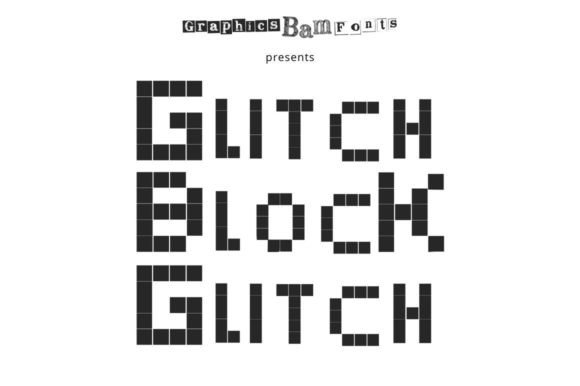
Glitch Block is a monospaced font that blends the aesthetic of retro computing with a modern, glitched-up twist. Its unique character set and distorted edges make it ideal for projects that require a nostalgic or edgy visual style. Whether you're designing a website, creating digital art, or working on a branding project, Glitch Block offers a distinctive look that stands out in a crowded design landscape.
This font isn’t just about style—it’s also about function. Its monospaced structure ensures consistent spacing between characters, making it suitable for coding, terminal interfaces, and other text-heavy applications where readability and alignment matter. By integrating Glitch Block into your workflow, you can add a subtle but impactful layer of visual interest without compromising usability.
Where Glitch Block Fits in the Design Process
Glitch Block can be used at various stages of a project, depending on your goals. Before starting a design, it can help set the tone by influencing color schemes, layout choices, and overall aesthetics. During the development phase, it can serve as a placeholder for final typography, allowing you to test how different elements interact visually. After completion, it can enhance the final output, adding a finishing touch that reinforces the intended mood or message.
For example, if you’re building a website with a retro theme, using Glitch Block for headings or navigation menus can create a cohesive look that aligns with the rest of your design. Similarly, in a branding project, this font can be used in logos, social media assets, or promotional materials to establish a strong visual identity.
Glitch Block in Action: Practical Use Cases
One common use case for Glitch Block is in digital art and graphic design. Artists often incorporate glitch effects to add texture and depth to their work. By using Glitch Block as a base font, they can achieve a more authentic retro feel without relying solely on image-based glitches. This approach saves time and maintains consistency across different design elements.
In web development, Glitch Block can be used for terminal-style interfaces, code snippets, or UI components that benefit from a vintage aesthetic. It pairs well with dark themes and monochrome color schemes, making it a versatile choice for developers who want to add a stylistic element to their projects.
For content creators, Glitch Block can be an effective tool for social media posts, video titles, or email newsletters. Its bold, distorted look grabs attention and can be used strategically to highlight key messages or call-to-actions. However, it's important to balance its use so it doesn't overwhelm the overall design.
Integration with Other Tools and Resources
Glitch Block works well with a variety of design and development tools. In Adobe Creative Suite, it can be used in Photoshop, Illustrator, or InDesign for graphic design projects. In code editors like Visual Studio Code or Sublime Text, it enhances the visual appeal of terminal windows and code blocks.
When working with design systems or style guides, Glitch Block can be included as a secondary font for specific elements that require a unique visual treatment. It complements more traditional fonts while maintaining a distinct identity. For teams, this means greater flexibility in applying the font across different platforms and mediums.
Additionally, Glitch Block can be combined with other glitch effects or digital distortion techniques to create layered, multi-dimensional designs. This synergy allows for more creative experimentation while maintaining a clear visual hierarchy.
Implementation Tips and Workflow Examples
To get the most out of Glitch Block, start by identifying where it will have the greatest impact. If you're working on a website, consider using it for headers, buttons, or footers. For a mobile app, it could be used in splash screens or loading animations. The key is to use it intentionally rather than as a default choice.
When implementing Glitch Block in a design system, ensure it’s properly documented. Include guidelines on when and how to use it, along with examples of appropriate sizes, weights, and colors. This helps maintain consistency across projects and reduces the risk of misuse.
A practical workflow might involve testing Glitch Block in different contexts before finalizing a design. For instance, you could create a mockup with and without the font to see how it affects readability and visual flow. This step helps ensure the font supports the overall user experience rather than detracting from it.
Factors to Consider for Long-Term Use
Before committing to Glitch Block for long-term projects, consider factors such as compatibility, accessibility, and scalability. Ensure it works well across different devices and screen sizes. Test it in various environments to confirm it remains legible and functional under different conditions.
Accessibility is another important consideration. While Glitch Block adds visual interest, it should not compromise the clarity of the text. Avoid using it in body copy or other critical information sections where readability is essential. Instead, reserve it for decorative or secondary elements where its unique style can shine without hindering usability.
For teams or organizations, establishing a standard for font usage can streamline the process. This includes specifying when Glitch Block should be used, which file formats are supported, and how it integrates with existing design assets. Clear guidelines help prevent confusion and ensure a cohesive visual language across all projects.
Conclusion: Embracing Glitch Block in Your Work
Glitch Block is more than just a trendy font—it’s a powerful tool that can elevate the visual quality of your projects. By understanding its strengths and limitations, you can integrate it into your workflow in a way that enhances both form and function. Whether you're a designer, developer, or content creator, this font offers a unique opportunity to express creativity while maintaining professionalism.
As with any design element, the key to success lies in thoughtful application. Experiment with Glitch Block in different contexts, observe its impact, and refine your approach over time. With careful implementation, it can become a valuable asset in your creative toolkit, helping you stand out in a competitive digital landscape.